Split a Restaurant Bill by Item
Splitting evenly is easy but rarely fair — the person who had a water and an appetizer ends up covering part of someone else's cocktails and entrée. Splitting by item fixes that, and SplitVibe makes it fast enough that no one minds doing it.
Split a restaurant bill in three taps
No mental math, no spreadsheet — scan, assign, done.
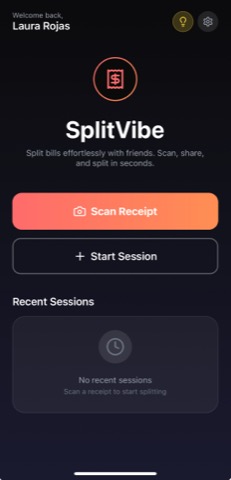
Scan the receipt
Snap the receipt and SplitVibe reads every line item automatically.
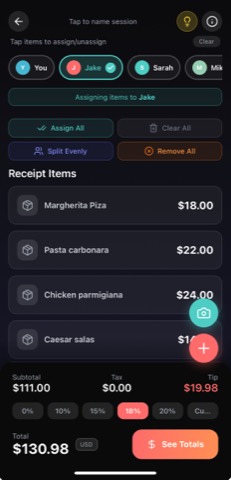
Assign by item
Tap each item to whoever ordered it — or split a shared plate between people.
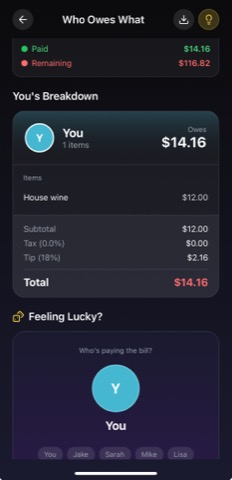
See who owes what
Tax and tip split fairly. Everyone sees the same breakdown, down to the cent.
Scan the receipt and SplitVibe lists every item. Tap an item to assign it to one person, or split a shared plate between several — the running total per person updates as you go. Tax and tip are allocated in proportion to what each person actually ordered, so the final numbers are fair down to the cent. No spreadsheet, no calculator app, no one doing sums on a napkin.
Pro tip: for shared dishes — that appetizer platter or the bottle of wine — assign the item to everyone who had it and SplitVibe divides just that item between them.
Just need a quick even split? Try the free split-the-bill calculator →
Why SplitVibe works for splitting by item
- ✓Assign each receipt item to the person who ordered it
- ✓Split shared plates between several people
- ✓Tax and tip allocated proportionally, not evenly
- ✓Live per-person total as you assign items
Ready to split smarter?
Free to download. Works on iOS and Android.
Frequently asked questions
How do you split a restaurant bill by item?
Step by step: (1) Scan the restaurant receipt with SplitVibe so every line item is listed automatically. (2) Add the people at your table. (3) Tap each item to assign it to whoever ordered it — for a shared plate, assign it to everyone who had it and SplitVibe splits just that item between them. (4) It keeps a live per-person total and allocates tax and tip in proportion to what each person ordered, so the numbers are fair to the cent. It's free on iOS and Android, with no sign-up needed to start.
How do you split a bill by item?
Scan the receipt so every item is listed, then tap each one to assign it to the person who ordered it. Shared plates can be split between several people. SplitVibe keeps a live per-person total and divides tax and tip proportionally.
Why split by item instead of evenly?
An even split means light eaters subsidize the big orders. Splitting by item means everyone pays for exactly what they had — fairer, and just as fast once the receipt is scanned.
Can you split a shared dish between people?
Yes — assign the item to everyone who shared it and SplitVibe divides just that item between them, then folds it into each person's total.