Bill Splitter for Restaurants
Splitting a restaurant bill shouldn't take longer than the meal. Someone had the steak, someone just had a salad, two people shared a bottle of wine — and now everyone's staring at the check doing mental math. SplitVibe turns that whole awkward moment into a few taps.
Split a restaurant bill in three taps
No mental math, no spreadsheet — scan, assign, done.
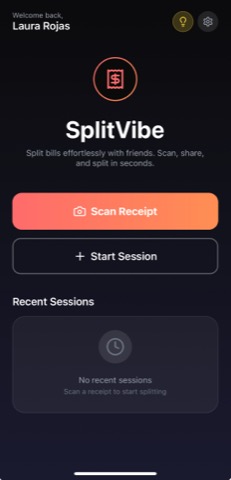
Scan the receipt
Snap the receipt and SplitVibe reads every line item automatically.
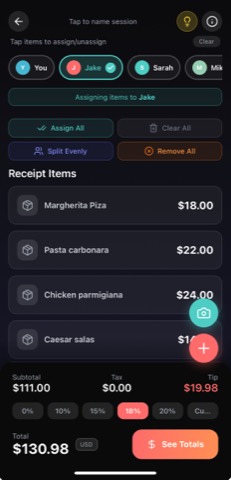
Assign by item
Tap each item to whoever ordered it — or split a shared plate between people.
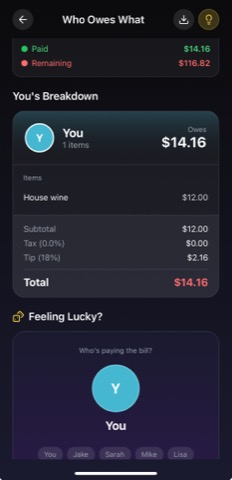
See who owes what
Tax and tip split fairly. Everyone sees the same breakdown, down to the cent.
Point your phone at the receipt and SplitVibe reads every line item automatically. Split the total evenly, or tap items to assign them to whoever ordered them — the app does the math, including each person's share of tax and tip. Everyone sees the same breakdown, so there's no debate about who owes what and no one quietly overpays. When you're done, share the session so the whole group has a record.
Pro tip: add tax and tip to the total before assigning items — SplitVibe spreads them proportionally, so the person who ordered the $12 salad isn't subsidizing the $45 steak.
Just need a quick even split? Try the free split-the-bill calculator →
Why SplitVibe works for restaurants
- ✓Scan the restaurant receipt — items are read automatically
- ✓Split evenly or assign each item to the person who ordered it
- ✓Tax and tip divided fairly across the table
- ✓Share a session code so the whole group sees the breakdown
Ready to split smarter?
Free to download. Works on iOS and Android.
Frequently asked questions
How to split a restaurant bill
Here's the quickest way: (1) Open SplitVibe and scan the restaurant receipt — it reads every line item automatically. (2) Add the people at your table. (3) Either tap Split Evenly for a one-tap even split, or assign each item to whoever ordered it. (4) SplitVibe divides tax and tip proportionally and shows exactly who owes what. (5) Share the session code so everyone sees the same breakdown and can mark themselves paid. It's free on iOS and Android, with no sign-up needed to start.
How do you split a restaurant bill fairly?
The fairest way is to split by item — each person pays for what they ordered, with tax and tip shared in proportion. SplitVibe does this automatically: scan the receipt, tap each item to whoever had it, and it works out everyone's share. If you'd rather keep it simple, an even split is one tap.
Is there an app to split a restaurant bill?
Yes — SplitVibe is a free app for iOS and Android that scans the receipt, splits it evenly or by item, and shows who owes what. You can start a split without signing up.
How do you split the bill with a big group?
Add everyone to the session, assign items (or split evenly), and share the session code so the whole table sees the same breakdown. Each person can mark themselves as paid, so nothing gets lost.
How are tax and tip split?
SplitVibe spreads tax and tip proportionally to what each person ordered — so the person who had a salad isn't quietly covering part of someone else's steak.